Reforge Build · 2025 to 2026
Taking an AI prototyping product from concept to launch
Reforge Build helped product managers turn ideas for existing products into interactive prototypes. I defined the product, designed and coded its first interface, and led product and design through launch.
- My work
- Product strategy, product design and design engineering
- Team
- Started with one engineer. Grew to five engineers, including a design engineer, plus a product designer.
- Product status
- Launched November 2025 · Later wound down

Product overview
Introducing Reforge Build
Product strategy
Product teams don’t want to prototype from scratch
Product teams already had customer feedback, a working product and ideas about what to improve. As AI made software easier to produce, our bet was that choosing the right solution would matter more.
I shaped Build around that decision: bring in product context, explore options and get feedback before committing to implementation. The goal was a prototype a team could discuss and test, without promising production-ready code.
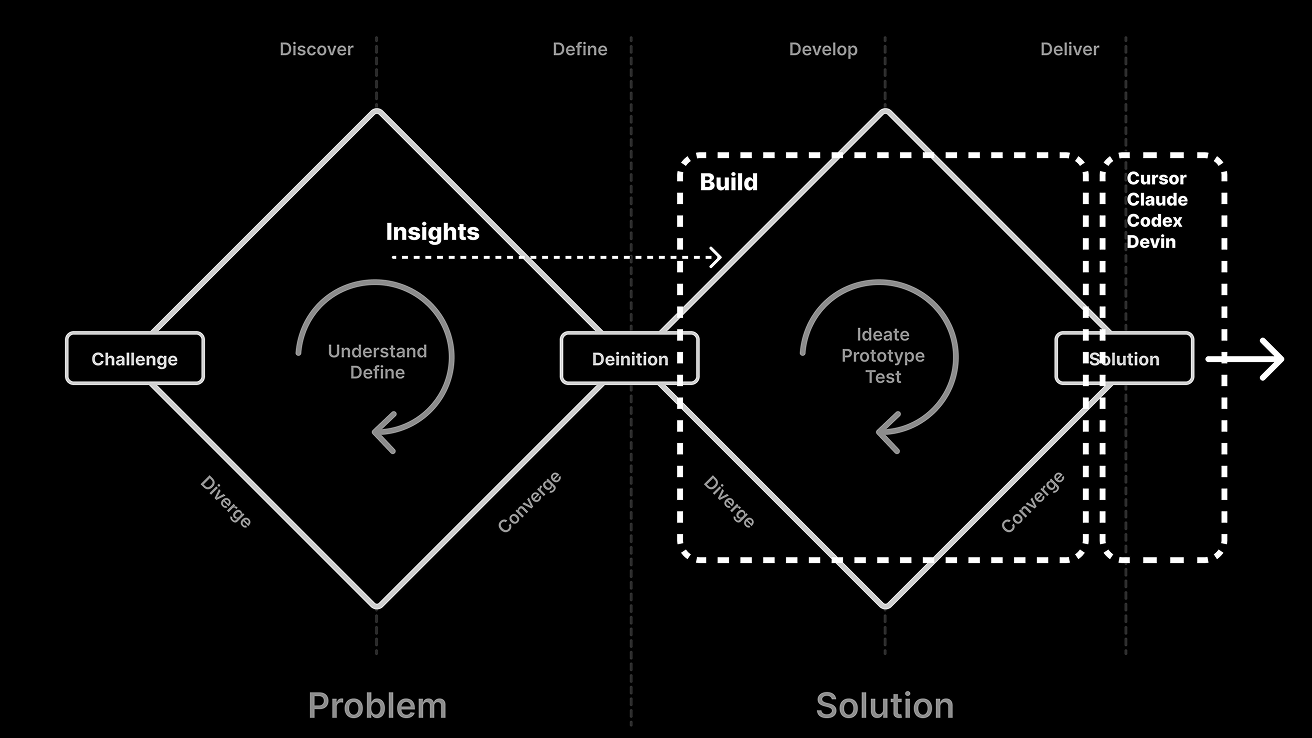
Build in the solution-development loop · August strategy
Build focuses on exploring and testing solutions. Customer insight comes from earlier in the process; implementation follows once a direction is chosen.
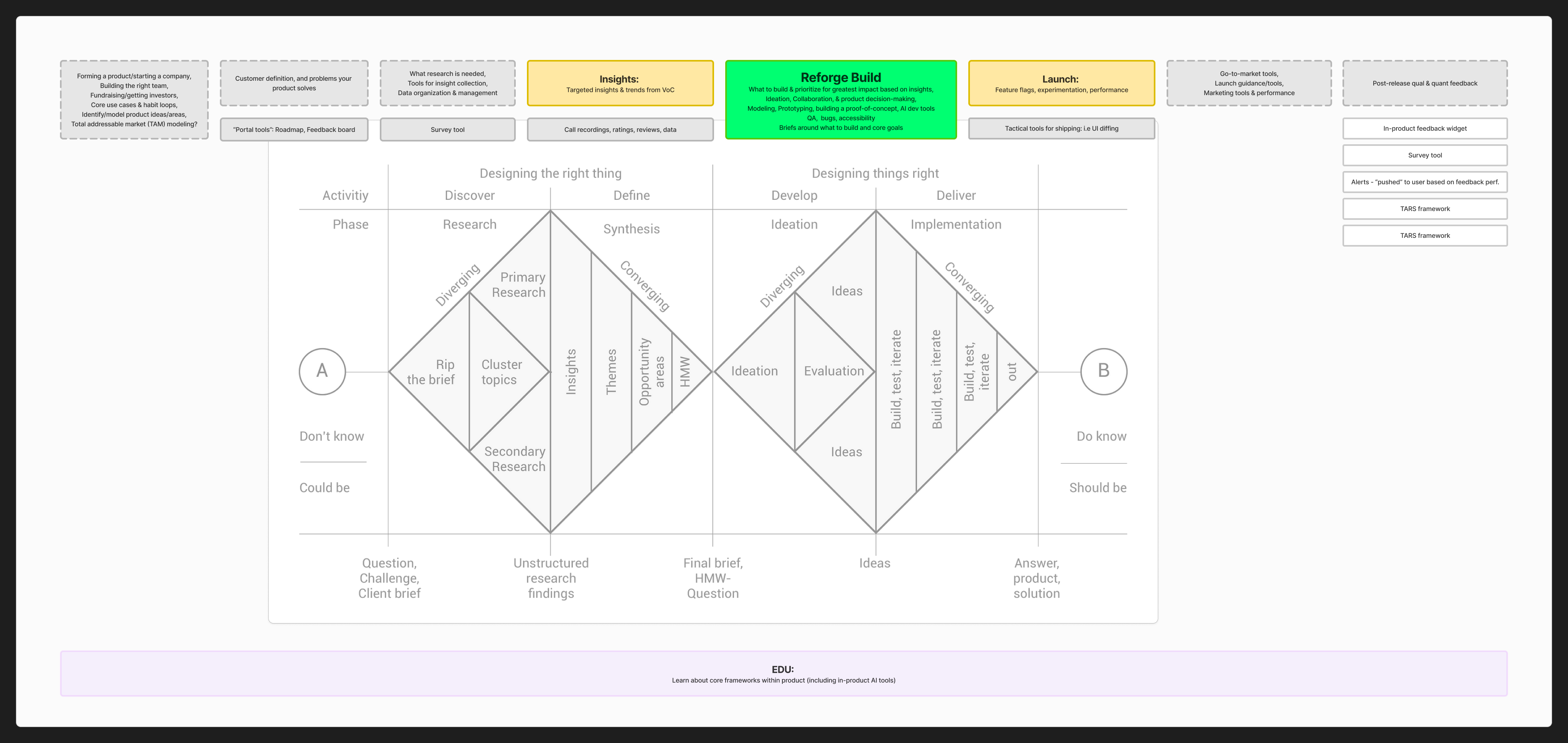
Reforge Build in the broader product strategy
Insights supplied customer evidence, Build supported solution exploration, and Launch covered experimentation and release. This wider strategy extended beyond Build’s first release.
Research and scope
Interviews with product practitioners showed where AI prototypes helped and where they fell short
Existing products were harder
Product leader · June 16, 2025
“really good at like starting from zero, less good at iterating on an existing code base.”
He supplied files and screenshots but questioned whether the result would help engineering. Build would help evaluate an idea; screenshots and briefs gave it a starting point.
Rough prototypes helped alignment
Senior product manager · June 18, 2025
“It's just to do it faster, to get early feedback”
She used rough prototypes with her boss and designer, then realistic Figma designs for customer testing. The level of detail depended on the conversation.
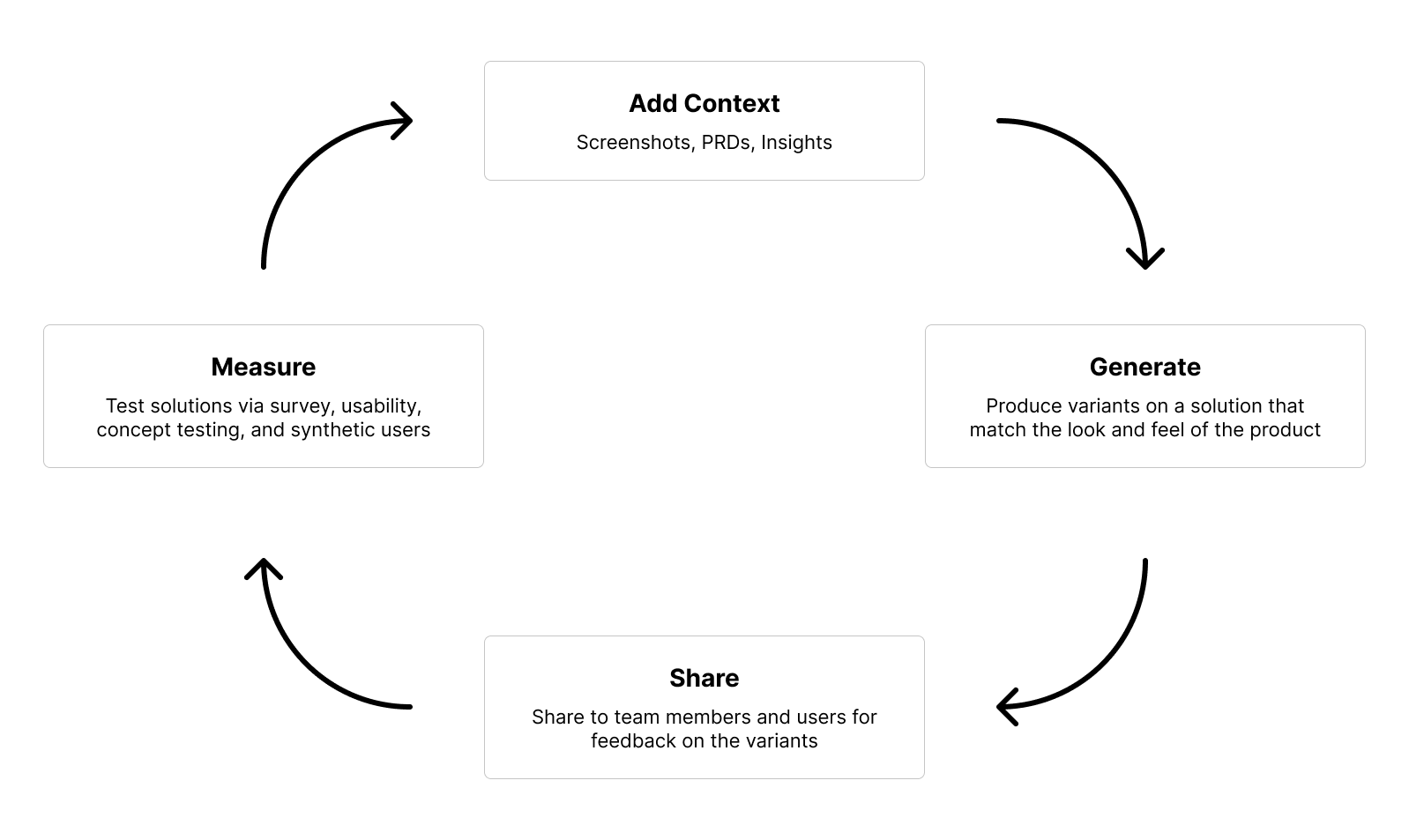
I scoped the first release around product context, generating options and sharing. Measurement stayed outside the first release.
Sharing as a growth strategy
The hypothesis: people invited to review a prototype might become Build users themselves, creating and sharing prototypes with their own teams.
Interface design
From a local prototype to the Build interface
I coded the first interface while one engineer built the coding agent and the environment that ran its output. These versions show how I refined navigation, context and preview controls around that split view.
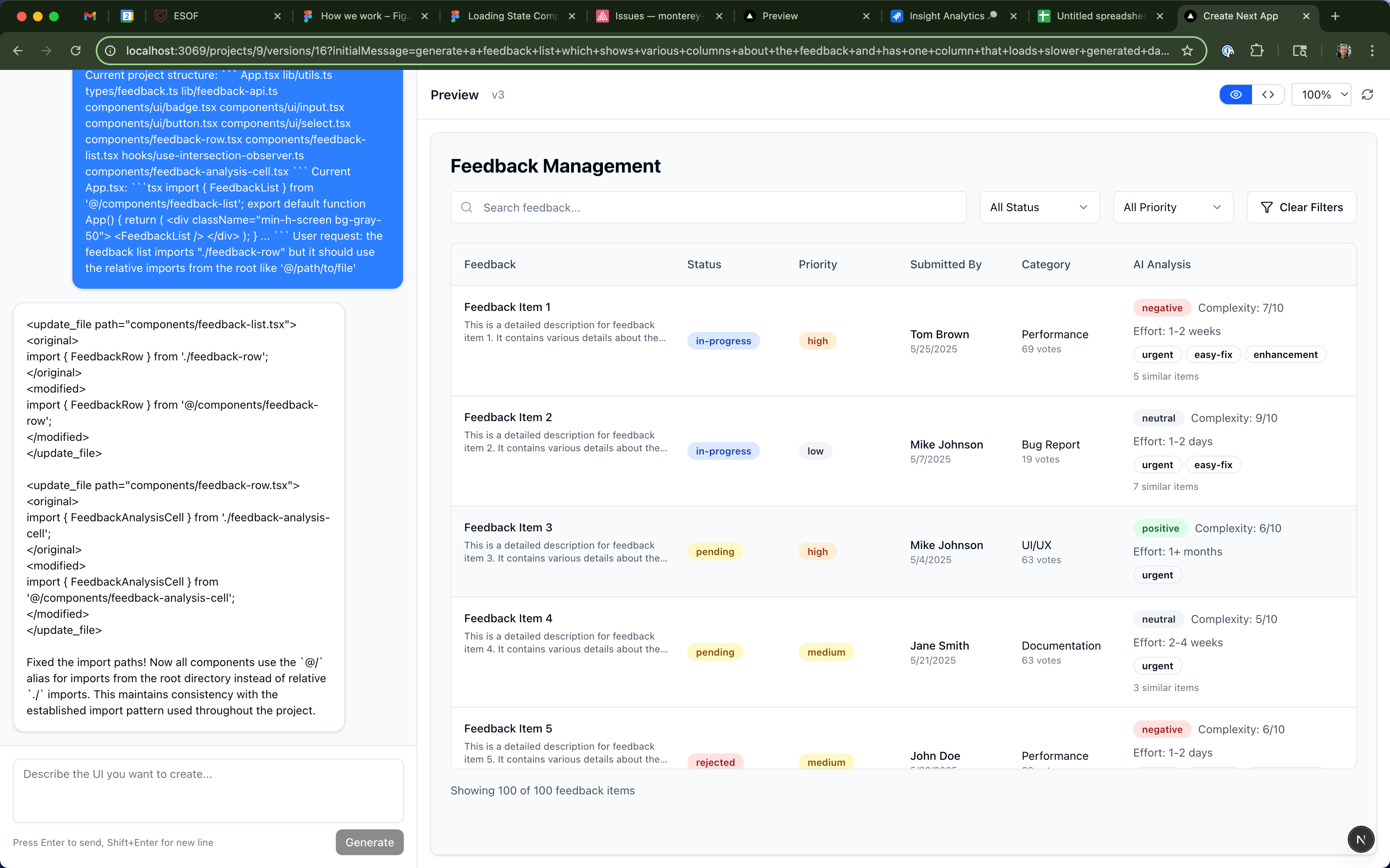
1. Building the first interface locally
A locally developed prototype with a working conversation and generated preview. Interface design was still minimal.
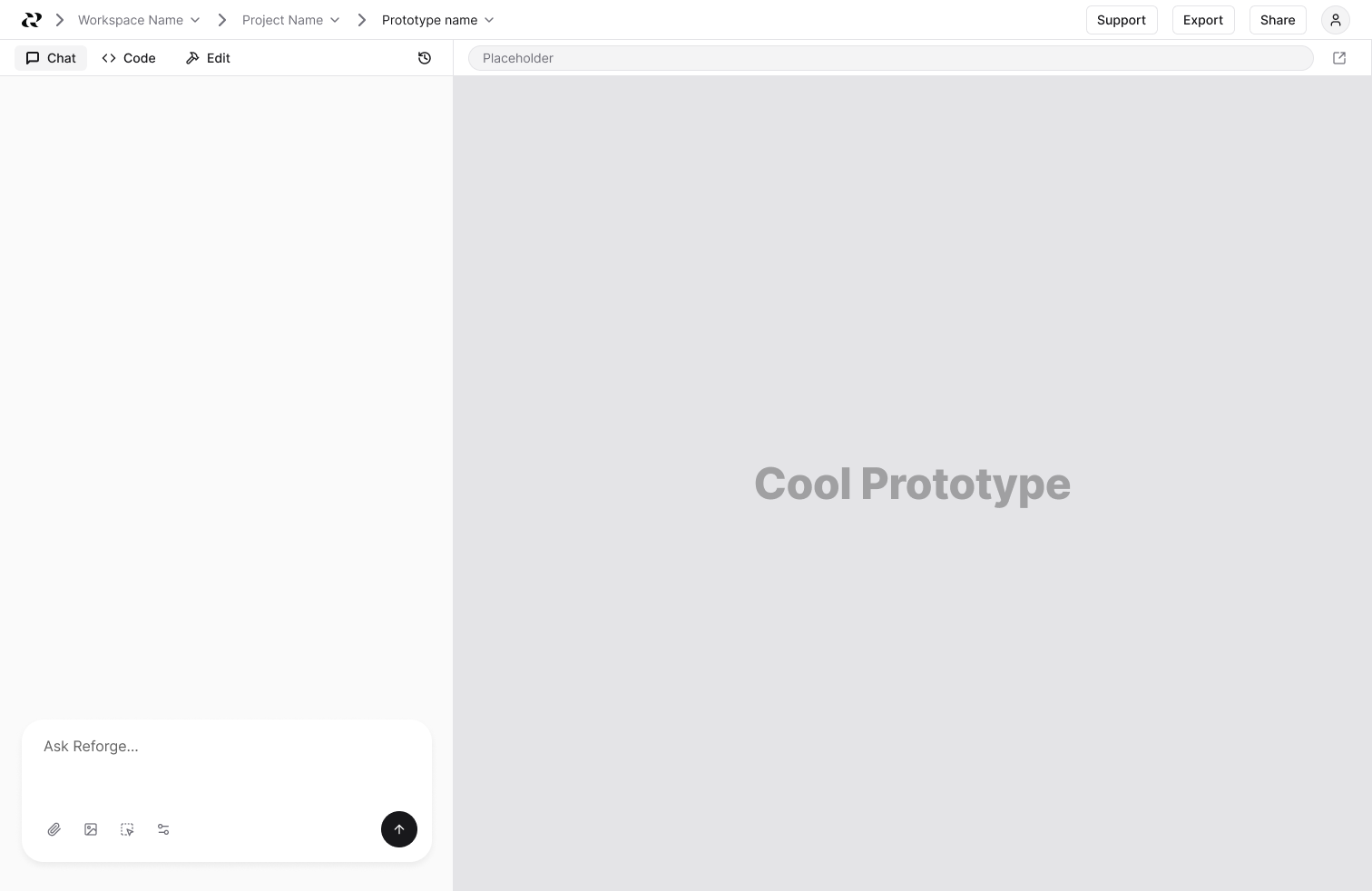
2. Establishing the chat and preview layout
Early interface design: workspace, project and prototype navigation above a split view, with Chat, Code and Edit beside the preview.
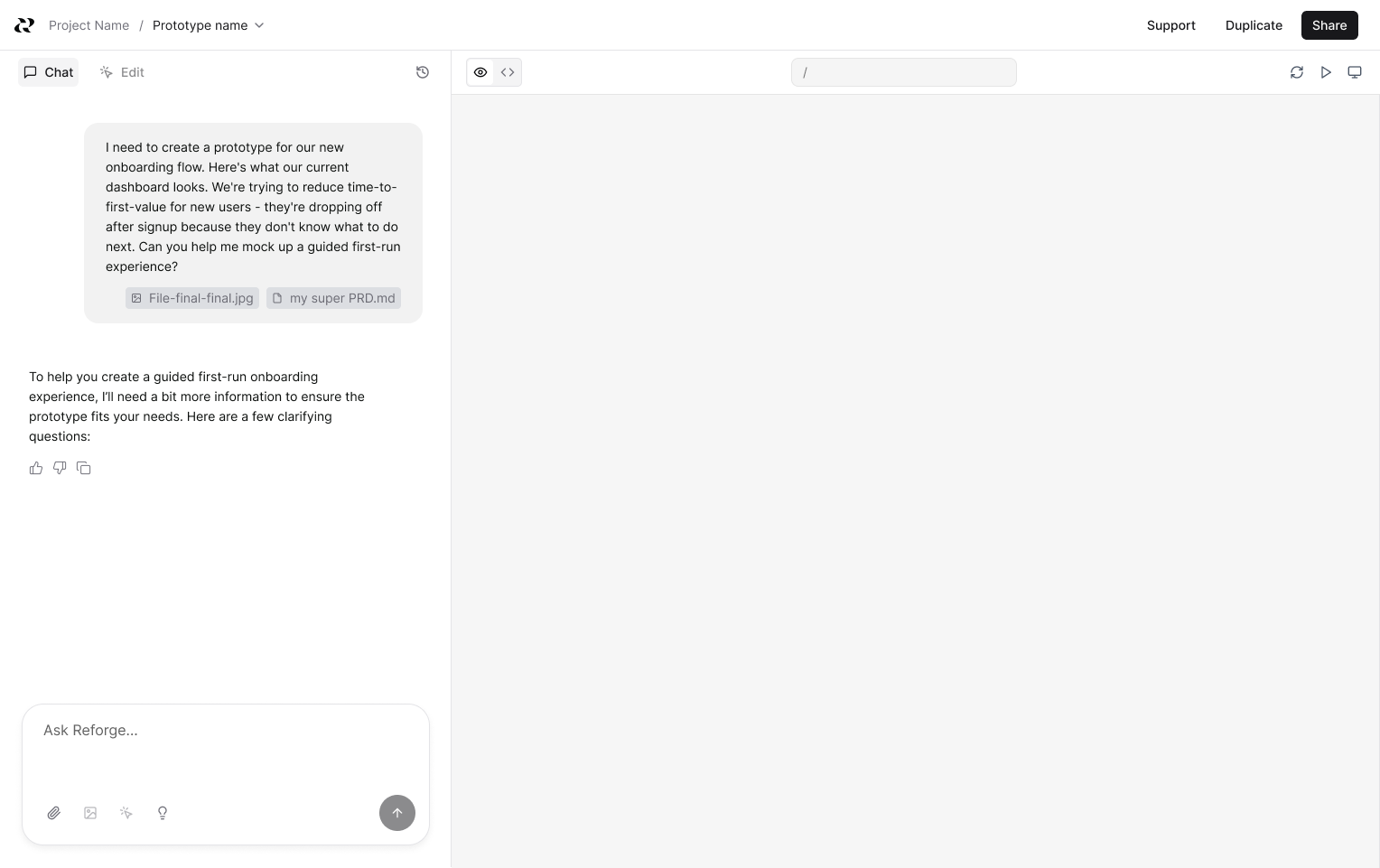
3. Bringing context into the conversation
The next iteration introduced attached product files and clarifying questions, with preview and code controls above the canvas.
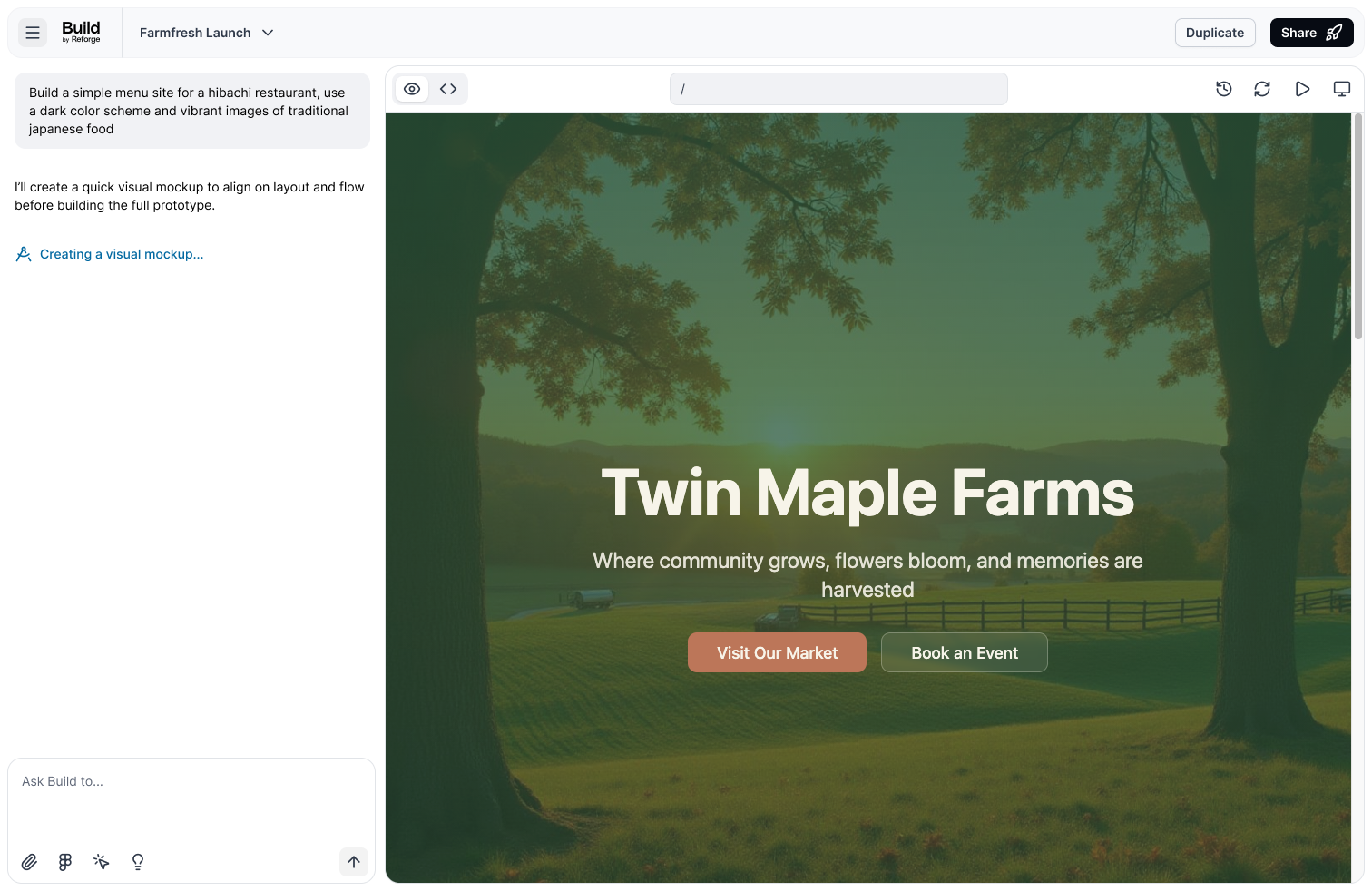
4. Refining the builder around the preview
The later interface gave the prototype more room, with a compact header, a narrower conversation panel and controls grouped around the preview.
Architectural decisions
A product model for context and versioned prototypes
Build needed to reuse context across projects while keeping each prototype’s identity, versions and review links intact. Those requirements shaped the product’s data model.
Scope context so it can be reused
Company requirements and design systems needed to be entered once, then reused. Project-specific material needed a narrower scope, ready for future team administration.
- Company / workspace
Design systems, company instructions and administrator-managed context.
Reusable across projects- Project
The problem, requirements and source files for a particular project.
Available to every prototype- Prototype
The conversation and generated versions for one direction.
Uses company + project context
Generation combined company instructions with project files selected by relevance. Retrieval used file summaries to avoid adding the entire project library to every prompt.
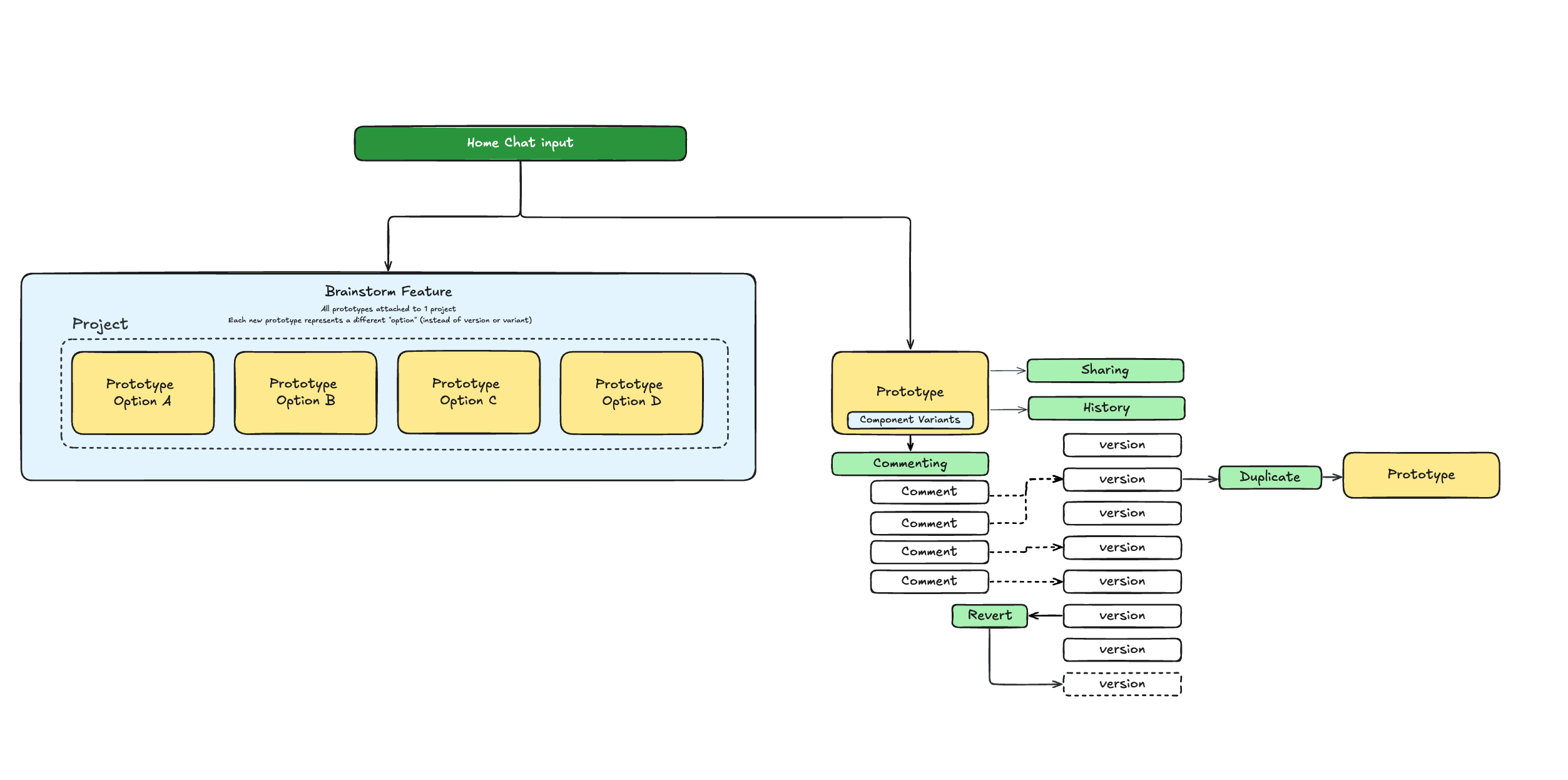
How prototypes, component variants and versions relate
Exploring another product direction, trying a different button and restoring an earlier design are different operations. The model needed to support each without losing context or attaching feedback to the wrong state.
Explore a different direction
Each prototype has its own identity and history. Teams can promote a chosen direction or duplicate it, retaining the source lineage and conversation context.
Try a change within that direction
Component variants belong inside a prototype. Choosing one replaces that component while keeping the prototype’s identity.
Return to earlier work without losing feedback
Versions record the prototype’s changing state. Restore creates a new version; comments stay with the version reviewed, while the share link opens the current version.
The prototype architecture
Developed with engineering, this diagram connects independent prototypes, component variants, version history, duplication, sharing and comments. Notice how duplication starts from a version and feedback stays attached to the version reviewed.
Design engineering
Selected examples of merged frontend work
Composer and preview redesignA unified prompt input and more room for the prototype.
I rebuilt the composer around a single container with a fixed footer for attachments and actions. Long messages scroll within the input, and changing collaboration modes keeps the controls the same size.
In the preview, I removed excess canvas padding, centered the URL field and regrouped the refresh, play and viewport controls. The changes covered the composer, application header and preview header.
Project and prototype navigationPersistent lists, clearer hierarchy and consistent navigation states.
I removed collapsing behavior from the Projects and Prototypes sections so both lists remained visible. Muted section labels separated the navigation hierarchy from the items people needed to select.
I aligned spacing and icon sizes across the sidebar, added a dedicated New project icon, and made folder icons reflect the active project. The update also accounted for scrolling long lists and using the sidebar on mobile.
Long prompts without hidden controlsKeep Create and attachments accessible when a brief gets long.
Pasting a long brief could expand the prompt field until the Create and attachment buttons were obscured. I rebuilt the input as one bounded container with a scrolling text area and persistent actions.
The shared component served home and project entry points. I preserved attachment previews, character validation and keyboard submission while changing how the input handled overflow.
Team and delivery
From product kickoff to Teams in six months
We started with one engineer and grew to five engineers, including a design engineer, plus a product designer. I owned product priorities, research and design, worked with engineering on the architecture, and contributed frontend code.
Delivery timeline
- July 2025
Product kickoff
Product scope and the first interface, with one engineer building the agent.
- August 2025
Waitlist and closed beta
Generation, product context, sharing and feedback in users’ hands.
- October 7, 2025
Open beta and individual billing
Open access, Free and Individual plans, and usage credits.
- November 12, 2025
Public launch
The wider launch followed beta access and the first billing release.
- December 2025
Team infrastructure
Workspace scoping, organization switching and shared-resource foundations.
- January 2026
Teams and team billing
Shared projects, prototypes and context, with pooled credits and team subscriptions.
Team-wide repository activity
Pull requests merged into main each month
2025
- Jun48
- Jul78
- Aug137
- Sep88
- Oct175
- Nov163
- Dec100
2026
- Jan144
- Feb258
- Mar62
Our working cycle
User conversations shaped the next change. AI supported synthesis, mocks and coding throughout the cycle.
- 01
Research and prioritize
I interviewed users and set priorities, using AI to help synthesize what we learned.
- 02
Scope and mock up
I gave engineering a rough spec with AI-generated and Figma mocks.
- 03
Build and refine
Engineers built on branches. We worked in Vercel previews, and I contributed code on the same branch.
- 04
Release and repeat
We pushed the change, then used feedback and user conversations to set the next priority.
Launch and learning
Adoption, retention and the move to Miro
By November 2025, Build had paying users. We continued improving generation and editing, then added team access and pricing.
Getting people to try Build was easier than keeping them. Output quality, broken workflows and low switching costs made repeat use harder. I still question whether our initial focus on PMs was broad enough.
As Build wound down, I shared our learnings with Miro’s prototyping team. After other work at Miro, I became the lead for Miro Prototyping.